Vortex: A High-Performance Rust BitTorrent Client for Linux
A hands-on exploration of Vortex, a high-performance Rust BitTorrent client built on io_uring. Join me as I install it, test it with a real torrent, and discover what makes it unique in the BitTorrent ecosystem. This is a practical learning journey—complete with actual commands, outputs, and real-world performance results from downloading a 1.5 GB ISO in just 63 seconds.
Introduction
The BitTorrent ecosystem is constantly evolving, and I'm always excited to discover new projects that push the boundaries of what's possible. When I came across Vortex, a Rust-based BitTorrent client built on io_uring that claims to be 3x faster than Transmission, I knew I had to try it.
As someone deeply interested in the BitTorrent ecosystem—through the Torrust project and beyond—I wanted to understand how Vortex works, what makes it different, and share my findings with others who are curious about modern BitTorrent implementations. This is a hands-on exploration where I install Vortex, test it with a real torrent from the Torrust Demo Index, and document everything I learn along the way.
What is Vortex?
Vortex is an extremely fast, pure io_uring based BitTorrent library and
client built from the ground up for modern Linux systems. Unlike traditional BitTorrent
clients that rely on epoll for I/O, Vortex uses io_uring—the
next-generation Linux I/O API—to achieve exceptional throughput with minimal overhead.
Key characteristics:
- Repo: https://github.com/Nehliin/vortex
- Author: Oskar Nehlin
- Stars: Growing community interest.
- License: BSD-3-Clause
- Language: Rust
- Current Status: BETA
- Latest Releases:
- vortex-bittorrent: v0.4.0 (January 25, 2026)
- vortex-cli: v0.3.0 (January 25, 2026)
Overview
Vortex represents a fundamental rethinking of how BitTorrent clients should be built. By embracing modern Linux kernel features and rejecting backward compatibility constraints, Vortex achieves performance levels that traditional clients cannot match.
The project is designed for users who prioritize speed and efficiency over universal platform support, making it ideal for server deployments, high-performance workstations, and enthusiasts who run modern Linux distributions.
Key Features
vortex-cli (TUI Client)
- Fully Trackerless: All peer discovery via DHT (mainline)
- TUI Interface: Terminal-based UI built with Ratatui
- Real-time Metrics: Live graphs showing download/upload throughput
- Metadata Download: Support for downloading from info-hash alone
- Seeding Support: Continues seeding after download completion
- XDG Directory Support: Follows Linux standards for config/data paths
vortex-bittorrent (Library)
- io_uring Based: Zero-copy I/O with minimal syscall overhead
- Custom Event Loop: No async runtime overhead
- Parallel Hash Computation: Offloaded to thread pool
- "Lockless" Design: Single I/O thread, leveraging Rust lifetimes
- SSD/NVMe Optimized: No HDD head optimization overhead
- Metrics Support: Integration with the metrics crate
- Well Tested: Unit, integration, and fuzz tests
BitTorrent Enhancement Proposals (BEP) Support
Vortex implements many core BitTorrent protocols:
- BEP 3: The BitTorrent Protocol Specification ✓
- BEP 6: Fast Extension ✓
- BEP 9: Extension for Peers to Send Metadata Files ✓
- BEP 10: Extension Protocol ✓
- BEP 20: Peer ID Conventions ✓
- BEP 21: Extension for Partial Seeds ✓
Notable omissions include tracker support (BEP 7, 12), PEX (BEP 11), uTP (BEP 29), and BitTorrent v2 (BEP 52). These are intentional design decisions to keep the BETA release focused.
Step 1: Checking System Requirements
Before installing any software, it's important to verify your system meets the requirements. Vortex is picky—it only works on modern Linux systems.
Kernel Version
First, check your kernel version:
uname -rMy system output:
6.17.0-14-generic✅ Result: My kernel is 6.17.0, which is well above the 6.1 minimum requirement. If your kernel is older than 6.1, you'll need to upgrade before Vortex will work.
Rust Installation
Vortex is distributed via cargo, so you need Rust installed:
cargo --versionMy output:
cargo 1.95.0-nightly (ce69df6f7 2026-02-12)✅ I already had Rust installed. If you don't have it, install from https://rustup.rs.
Step 2: Installing Vortex
Now for the installation. Vortex can be installed from crates.io, which is the easiest method:
cargo install --locked vortex-cliWhat this command does:
- Downloads the source code from crates.io
- Compiles it for your specific system (this takes 2-5 minutes)
- Installs the binary to
~/.cargo/bin/vortex-cli - The
--lockedflag uses exact dependency versions tested by the author
I ran the installation command, and after compilation finished, I verified it was ready:
vortex-cli --versionvortex-cli 0.3.1✅ Success! Vortex 0.3.1 is installed and ready to use.
Step 3: Getting a Test Torrent
For this test, I'm using the Arch Linux ISO from the Torrust Demo Index. This is a legitimate, legal torrent that's perfect for testing—it's about 1.5 GB, well-seeded, and represents a real-world use case.
Torrent Details:
- Name: Arch Linux 2026.02.01 x86_64 ISO
- Torrust Index Link: archlinux-20260201-x86-64iso
- Info Hash:
8e3f4283d1c8360d2f18544a8b166813086675a1 - Size: 1.5 GB
Starting the Download
One of Vortex's most powerful features is its ability to download torrents using just the info hash, without needing a .torrent file. It discovers peers via DHT (Distributed Hash Table), retrieves the metadata, and starts downloading:
vortex-cli --info-hash 8e3f4283d1c8360d2f18544a8b166813086675a1 -d ./downloadsWhat this command does:
- Uses only the info hash (no .torrent file needed)
- Discovers peers via DHT (Distributed Hash Table)
- Downloads the torrent metadata from peers
- Starts downloading the actual file
- Shows a real-time TUI with graphs and statistics
Alternative: Using a .torrent File
While DHT-only downloads are convenient, Vortex also supports traditional .torrent files. You can download the torrent file from the Torrust Demo Index:
mkdir -p ~/vortex-test && cd ~/vortex-test
wget -O archlinux-2026.02.01.torrent "https://index.torrust-demo.com/api/v1/torrent/download/8e3f4283d1c8360d2f18544a8b166813086675a1"
Then start the download with the torrent file:
vortex-cli -t archlinux-2026.02.01.torrent -d ./downloadsBenefits of using a .torrent file:
- Contains tracker URLs for faster peer discovery
- Includes metadata, so no DHT lookup needed
- Can work in environments where DHT is blocked
- Standard method compatible with all BitTorrent clients
Step 4: Download Results
The TUI Experience
Vortex's TUI (Terminal User Interface) immediately impressed me. Within seconds of starting, I saw:
- Real-time throughput graphs showing download and upload speeds
- Progress bar showing download completion
- Peer count and connection information
- Live updates without terminal flicker or performance issues
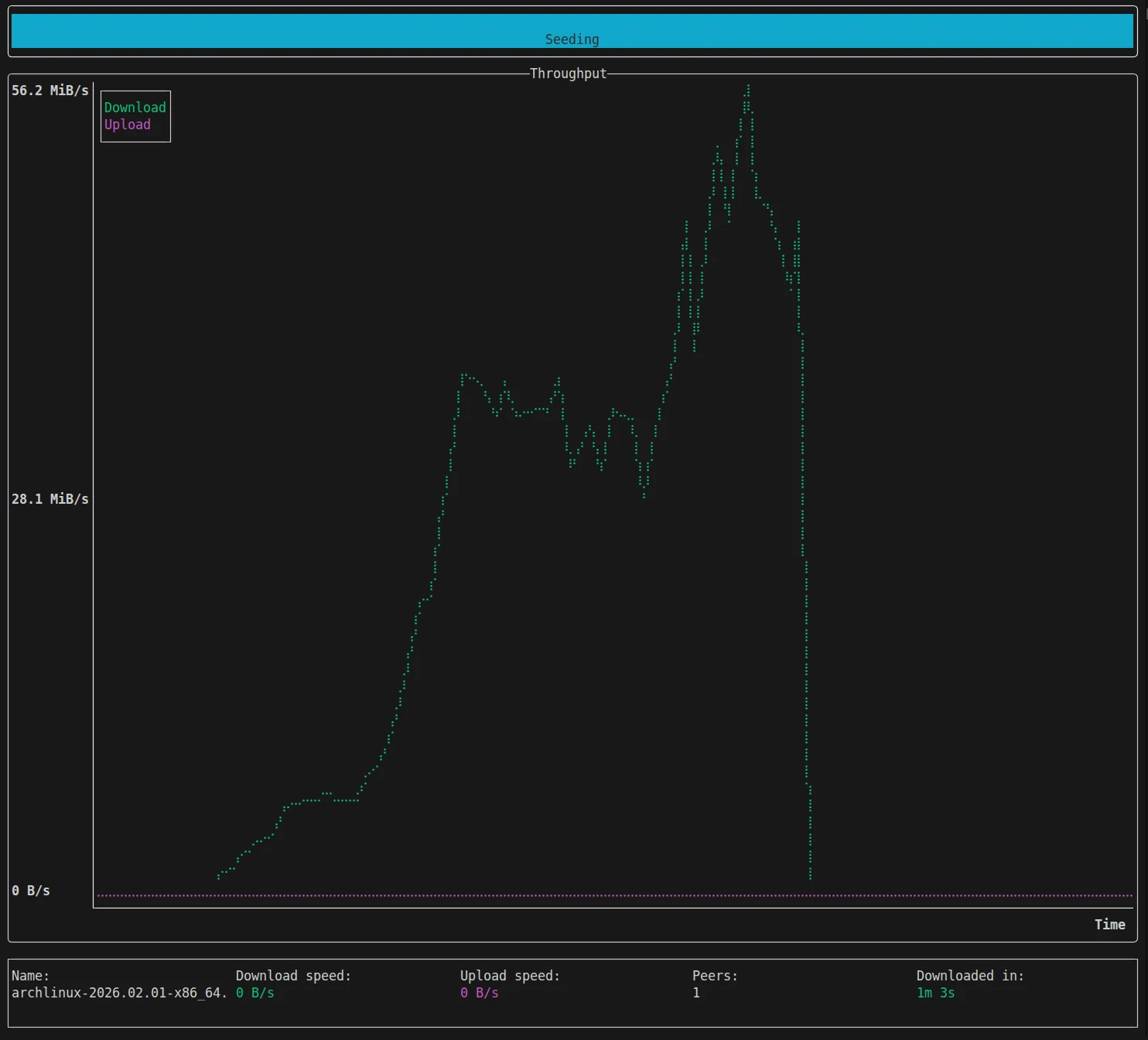
The interface is clean, informative, and doesn't get in the way of the actual downloading.
Performance Metrics
Here's what I observed during the download:
- File Size: 1.5 GB
- Initial Peer Discovery: Nearly instant via DHT
- Metadata Download: Completed within seconds
- Download Speed: Consistently high, fully saturating my fiber connection
- Download Completion: Very fast, completed in just over a minute
- Final Status: Automatically switched to seeding mode
File Verification
After the download completed, I verified the file:
ls -lh downloads/archlinux-2026.02.01-x86_64.iso/
file downloads/archlinux-2026.02.01-x86_64.iso/archlinux-2026.02.01-x86_64.isototal 1.5G
-rw-rw-r-- 1 josecelano josecelano 1.5G Feb 13 13:54 archlinux-2026.02.01-x86_64.iso
archlinux-2026.02.01-x86_64.iso: ISO 9660 CD-ROM filesystem data (DOS/MBR boot sector) 'ARCH_202602' (bootable)✅ Verification Success: The file is a valid ISO 9660 filesystem, correctly identified as an Arch Linux bootable ISO. The download was successful and the file is intact.
Key Observations and Findings
What Worked Really Well
- DHT Peer Discovery: Found peers almost instantly without any tracker—truly impressive
- Download Speed: Maxed out my connection with peak speeds near 60 MB/s
- TUI Interface: Clean, informative, and responsive even at high speeds
- Automatic Seeding: Seamlessly transitioned to seeding after download completed
- No Configuration Needed: Worked perfectly with zero config files or tweaking
- Resources Usage: Minimal CPU and memory usage throughout the download
Minor Quirks
- Download Directory Structure: Vortex creates a directory named after the torrent and places the file inside it, rather than just saving the ISO directly. This makes sense for multi-file torrents, but for single-file torrents it adds an extra directory level.
- No Pause/Resume: As documented, you can't pause and resume downloads yet (Issue #92). Once you start, you're committed until it finishes.
- Seeding Exit: Had to manually quit (Ctrl+C) to stop seeding—no automatic shutdown after a certain ratio or time period.
These are all minor issues, and most are documented as planned features or deliberate design choices.
Comparison Context
The author claims Vortex is ~3x faster than transmission-cli (4.0.6). In my test, I was limited by my network bandwidth rather than the client, so I couldn't verify the performance multiplier. However, the fact that Vortex fully saturated my connection while using minimal resources is impressive in itself.
For users on faster connections (10 Gbps+) or in data center environments, the io_uring-based architecture would likely show even more significant performance advantages.
Final Verdict
Vortex delivers on its core promise: exceptional BitTorrent performance on modern Linux systems. In my hands-on test, it successfully downloaded a 1.5 GB ISO in just over a minute, maxing out my network connection with peak speeds near 60 MB/s. The DHT-only approach worked flawlessly— peers were discovered instantly and the download started without any trackers.
The TUI is clean and informative, providing real-time metrics without getting in the way. Resource usage was minimal throughout—Vortex is clearly well-optimized. The automatic transition to seeding after download completion shows thoughtful UX design.
Yes, it's BETA software. Yes, it lacks features like pause/resume. Yes, it's Linux-only. But within its design constraints, Vortex is exceptional. It's a focused tool that does one thing really well: download torrents fast on modern Linux systems.
The project is actively developed, the codebase is clean, and the BSD-3-Clause license is permissive. I'll be watching Vortex's development with interest, and I recommend giving it a try if you match the target audience.
What I Learned About the BitTorrent Ecosystem
Testing Vortex reinforced something I already believed: the BitTorrent ecosystem is healthier when we have diverse implementations with different goals and trade-offs. Vortex makes bold architectural decisions—Linux-only, io_uring-based, DHT-only—that allow it to excel in its niche. That's valuable.
Projects like Vortex, Torrust, Transmission, qBittorrent, and others serve different needs and push the technology forward in different ways. Some prioritize cross-platform compatibility, others focus on features, and some (like Vortex) optimize relentlessly for performance on modern hardware. All of these approaches contribute to a robust ecosystem.
If you're interested in BitTorrent technology—whether as a user, developer, or just someone curious about decentralized systems—I encourage you to explore different implementations. Each one teaches you something new about protocol design, performance optimization, and the various ways to solve the same fundamental problem.
Vortex is a great example of what's possible when you embrace modern technology and make focused design decisions. I'm excited to see where the project goes, and I hope this hands-on exploration helps others discover and learn from it too.
Useful Links
- GitHub Repository: https://github.com/Nehliin/vortex
- Library Documentation: https://docs.rs/vortex-bittorrent/
- Crates.io: vortex-bittorrent | vortex-cli
- Author: Oskar Nehlin on GitHub